
PK365 Deposit and Withdraw – Easy & Secure Payment Guide
PK365 Deposit and Withdraw is a simple and secure process designed for a smooth user experience. Whether you’re adding funds to your account or withdrawing your available balance, this guide will walk you through each step. You’ll also find helpful tips, solutions to common transaction issues, and answers to frequently asked questions to make every payment easy and hassle-free.
How to Deposit Money on PK365 Game
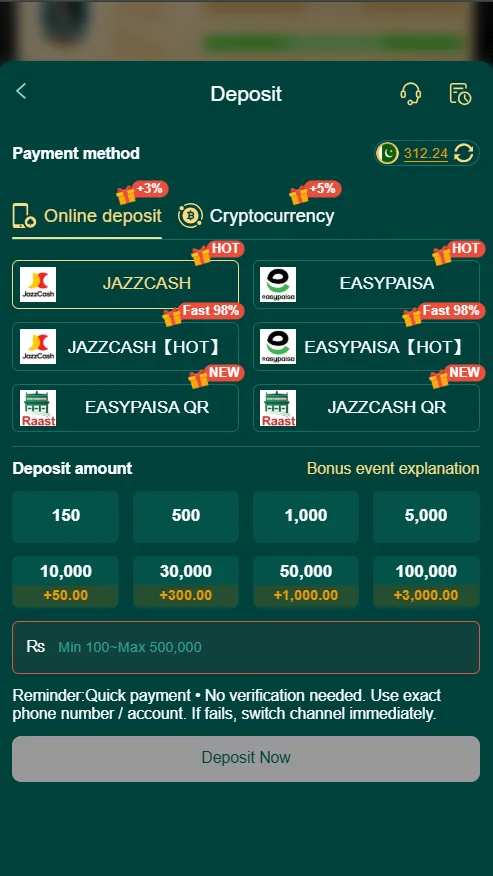
Depositing funds into your PK365 Game account is quick and convenient. Follow the steps below.
Step 1: Log In to Your Account
Open the PK365Game.com.pk website and sign in using your registered mobile number or username and password.
Step 2: Open the Deposit Section
Go to the Wallet or Deposit page from your account dashboard to view the available payment options.
Step 3: Choose a Payment Method
Select your preferred payment method from the available options provided by PK365 Game.
Step 4: Enter the Deposit Amount
Type the amount you want to deposit and carefully review the payment details before continuing.
Step 5: Confirm Your Deposit
Complete the payment and wait for the transaction to be processed. Once successful, the funds will appear in your PK365 Game wallet.
Common Deposit Problems & Solutions
Here are some common deposit issues and their solutions:
- Deposit Not Received: Wait a few minutes and refresh your account balance.
- Incorrect Payment Details: Double-check your payment information before confirming.
- Insufficient Balance: Make sure you have enough funds to complete the deposit.
- Slow Internet Connection: Use a stable internet connection to avoid interruptions.
- Transaction Failed: Try the payment again or contact customer support if the issue continues.
Checking your payment details before confirming can help prevent most deposit problems.
How to Withdraw Money from PK365 Game
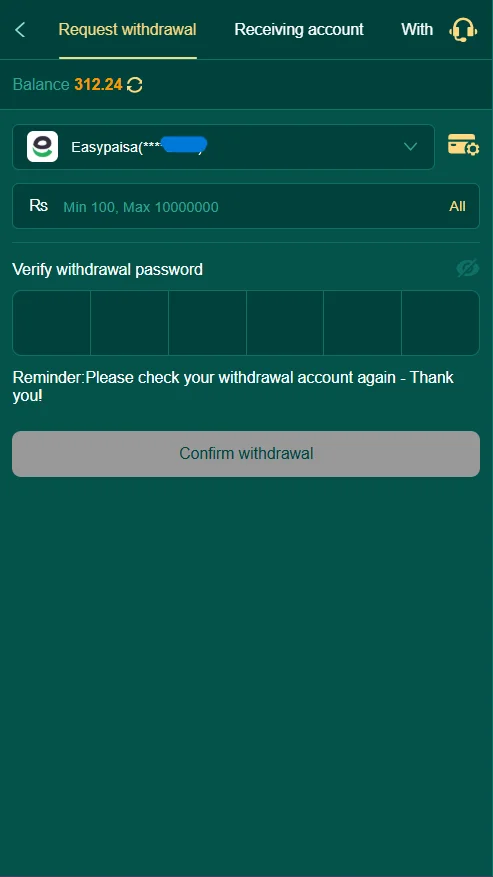
Withdrawing your available balance is just as easy. Follow these simple steps.
Step 1: Open the Withdrawal Section
Log in to your PK365 Game account and navigate to the Withdraw page from your dashboard.
Step 2: Select Your Withdrawal Method
Choose the payment method linked to your account where you want to receive your funds.
Step 3: Enter the Withdrawal Amount
Input the amount you wish to withdraw and ensure it meets the platform’s withdrawal requirements.
Step 4: Verify Your Information
Double-check your payment details and account information before submitting your request.
Step 5: Submit Your Withdrawal Request
Click the Withdraw button and wait for your request to be processed. Processing time may vary depending on the selected payment method.
Common Withdrawal Problems & Solutions
Here are some common withdrawal issues and their solutions:
- Withdrawal Pending: Wait a few minutes, as some requests take longer to process.
- Incorrect Payment Details: Check your payment information before submitting your request.
- Withdrawal Rejected: Ensure you meet the platform’s withdrawal requirements.
- Verification Required: Complete any required account verification to continue.
- System Delay: Temporary maintenance or network issues may delay processing. Try again later if needed.
Reviewing your details before submitting a withdrawal can help prevent most common issues.
Things to Check Before Making a Transaction
Before depositing or withdrawing funds, keep these important points in mind:
- Verify your payment details before confirming.
- Use only your own payment account.
- Maintain a stable internet connection.
- Enter the correct transaction amount.
- Review any minimum or maximum transaction limits.
- Save your transaction record for future reference.
Safety Tips for Secure Transactions
Keep your PK365 Game account secure by following these simple tips:
- Use a strong and unique password.
- Never share your login credentials with anyone.
- Use only the official PK365Game.com.pk website or app.
- Keep your payment information private.
- Log out after using a shared device.
- Monitor your transaction history regularly.
Final Words
PK365 Game makes deposit and withdraw simple, secure, and convenient for every user. By following the correct steps, reviewing your payment details carefully, and using the official PK365 Game platform, you can enjoy smooth and hassle-free transactions. Whether you’re adding funds to your wallet or withdrawing your balance, following the recommended guidelines will help ensure a safe and reliable experience every time.
Frequently Asked Questions
Most deposits are processed within a few minutes. However, processing time may vary depending on the selected payment method and network conditions.
First, check your payment details and wait a few minutes. If your balance is still not updated, contact customer support with your transaction details.
Withdrawal requests are usually processed within the platform’s standard processing time. The exact time depends on the payment method and account verification.
A withdrawal may remain pending due to account verification, payment processing, or temporary system delays. If the delay continues, contact customer support.